

Removing a complex background is challenging. Fine details like curves, hair, fur, glass, and fabric make precise isolation difficult. Clipping path and image masking are two core professional editing techniques. Both separate subjects from backgrounds, but each is tailored for distinct image types.
A clipping path works especially well when an object has a clear, defined edge. Image masking is more suitable when the edges are soft, fine, transparent, or difficult to isolate with a hard outline.
Choosing the right background removal technique can make a noticeable difference in the final image. Choose the wrong technique and problems follow. Rough edges appear, fine details vanish, and products end up looking unnatural.
So, which one should you use? The answer depends mainly on the subject and its edges.
Table of Contents
What Is the Difference Between Clipping Path and Image Masking?
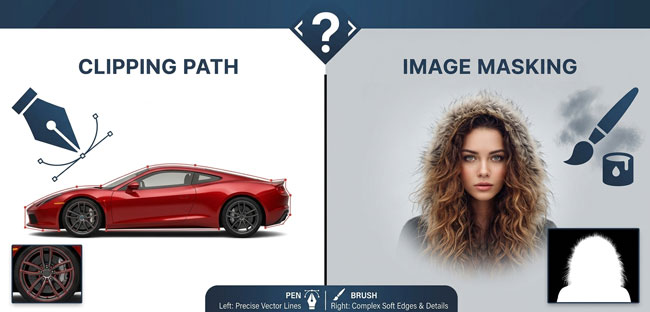
Edge characteristics dictate the choice. Hard-edged items require precision vector paths, while soft or semi-transparent details demand pixel-level masking.
What Is a Clipping Path?
A clipping path builds a vector-based outline around an object. Editors typically create this precise boundary using Photoshop’s Pen Tool. The path follows the object’s edge and can be used to separate the subject from its background.
It works particularly well for products with hard, clearly defined edges, such as:
- Shoes
- Furniture
- Electronics
- Bottles
- Boxes
- Appliances
- Cars
- Jewelry with defined outlines
Because the path is based on vector coordinates, it can produce a clean, precise boundary. This makes it useful for product catalogs, e-commerce images, print materials, and other work where sharp edges matter.
Distinct, traceable boundaries guide your choice. Use a clipping path whenever an object features sharp, clean edges that are easy to follow.
What Is Image Masking?
Image masking offers greater flexibility. It leverages transparency to hide or reveal specific parts of an image, making it ideal for complex subjects. In Photoshop, a layer mask can be edited to control which areas of a layer remain visible. Adobe layer masks hide or reveal image portions using selections, transparency, or painting. This non-destructive method gives editors precise control over visibility.
Unlike a simple hard-edged selection, masking can preserve different levels of transparency.
This makes it useful for subjects such as:
- Human hair
- Animal fur
- Feathers
- Smoke
- Glass
- Sheer fabric
- Fine fibers
- Soft or irregular edges
Hair masking preserves individual strands and flyaway hairs. This level of detail remains difficult to reproduce using a standard clipping path. Soft, fuzzy, transparent, or highly detailed edges require a different approach. Masking becomes the appropriate choice when objects lack clean, simple boundaries.
Clipping Path vs. Image Masking at a Glance
| Feature | Clipping Path | Image Masking |
|---|---|---|
Main method |
Vector path |
Pixel-based mask |
Best for |
Hard, defined edges |
Soft and complex edges |
Common examples |
Shoes, furniture, electronics |
Hair, fur, glass, fabric |
Edge control |
Precise and sharp |
Flexible and gradual |
Transparency |
Limited |
Supports partial transparency |
Common use |
Product cutouts and catalogs |
Portraits, fashion, complex products |
Editing flexibility |
High for defined shapes |
High for detailed edges |
Neither technique is automatically better. The image determines which one makes sense.
Why Clipping Path and Image Masking Matter in 2026
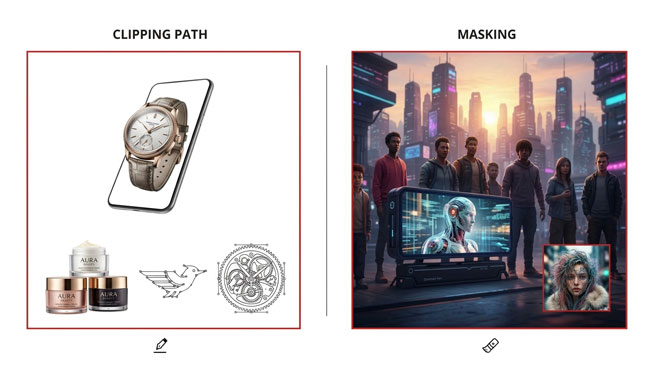
High-quality product and commercial photography is now used across websites, marketplaces, catalogs, advertisements, social media, and digital campaigns. A poorly cut-out subject can stand out immediately, especially when the image is placed on a completely different background.
At the same time, modern editing software has made automated background removal much faster. Automated tools can instantly isolate subjects and generate transparent or masked results. Photoshop includes these features to streamline background removal workflows. Adobe recommends manually refining the mask when the automatic result is not perfect.
Automated tools offer a fast starting point for isolation. Complex edges and fine details, however, still require manual refinement. Complex subjects like hair against matching backgrounds, transparent glass, fur, lace, and fine fabric challenge automated systems. These materials demand meticulous manual refinement to look natural.
The goal is not to use the most advanced tool available. The goal is to produce a clean and believable result using the technique that suits the image.
High-volume product workflows rely on consistent execution. Choosing the correct technique for each image type keeps large-scale processing efficient and uniform.
When Should You Use a Clipping Path?
A clipping path is generally the better option when the subject has a solid shape and a clearly visible boundary.
E-commerce Product Photos
Shoes, handbags, electronics, furniture, bottles, and packaged goods feature clean edges. These items lend themselves to accurate vector path tracing. A clipping path delivers precise cutouts for white-background product shots and new marketing backdrops. This vector-based precision ensures clean separation for commercial assets.
Products with Smooth Curves
A product does not have to be completely square or rectangular.
Round bottles, watches, plates, chairs, and other curved products can also work well with a clipping path when their boundaries are clearly visible.
Images Requiring Multiple Paths
Some product photographs contain several areas that need to be edited separately.
For example, different parts of a shoe may need individual color adjustments. Multiple paths can provide more control over those areas.
Print and Catalog Work
Clean, defined edges ensure seamless placement in brochures, catalogs, advertisements, and digital layouts. This sharp separation maintains visual professional standards.
A clipping path provides a precise outline for placing subjects against new backgrounds or layouts. This vector-based precision ensures clean placement across various designs.
When Should You Use Image Masking?
Image masking becomes more useful when a clipping path would remove important details or create an unnatural edge.
Hair and Fur
Human hair and animal fur contain hundreds or thousands of small strands.
Tracing every hair strand with a Pen Tool is impractical. This method typically produces a hard, artificial edge that ruins realism.
Proper fur masking workflows preserve natural texture while separating subjects from original backgrounds. This technique maintains realistic fine-detail fidelity.
Transparent Objects
Glass, bottles, windows, and some plastic products can allow light and background colors to pass through them.
A simple clipping path isolates overall shapes, yet fails to capture the subtle transparency required to render glass realistically.
Masking allows an editor to control transparency and retain those details.
Sheer and Fine Fabrics
Veils, lace, chiffon, mesh, and similar materials can have semi-transparent areas that need more gradual edge control.
Masking provides the flexibility needed to preserve these details.
Complex or Similar Backgrounds
Sometimes the subject and background have similar colors or textures. In these situations, creating a simple hard-edged path may not produce a natural result.
A combination of selections, masks, and edge refinement can provide better control.
Can Clipping Path and Image Masking Be Used Together?
Professional editing workflows frequently combine both techniques on a single image. Using clipping paths for clean structural edges alongside masking for intricate details achieves optimal results.
Consider a fashion photograph showing a model wearing a jacket.
The jacket may have clean, defined edges that can be handled with a clipping path. The model’s hair, contains fine strands that need masking.
There is no reason to force the entire image into one technique. A hybrid workflow can use:
- Clipping path for hard, defined edges
- Image masking for hair and soft details
- Additional masking for transparent or semi-transparent areas
- Manual edge refinement where necessary
This approach allows the editor to use the most suitable method for each part of the image rather than treating every edge in exactly the same way.
Adobe’s masking tools enable editors to refine selections and soften edges. This control creates smooth, natural transitions between subjects and new backgrounds.
How to Choose the Right Background Removal Technique
When deciding between clipping path and masking, start by looking closely at the subject’s edges.
Ask these questions:
Are the edges hard and clearly defined?
If yes, a clipping path is usually a good starting point.
Does the subject contain hair, fur, feathers, or fine fibers?
Image masking will generally provide better control.
Is the object transparent or translucent?
Masking is usually more suitable because transparency needs to be preserved.
Does the image contain both hard and soft edges?
Consider a hybrid workflow using both techniques.
Is the image going to be used for e-commerce or a catalog?
For products with clearly defined edges, clipping paths can provide the clean cutout commonly needed for product presentation. The important thing is not to choose based on the name of the service. Choose based on what the image actually requires.
FAQs about Clipping path vs Image masking
Is a clipping path the same as image masking?
No. Vector outlines define sharp boundaries, whereas pixel-level masks handle intricate details and subtle transparency transitions. They can achieve similar results in some situations but are better suited to different types of edges.
Which is better for hair: clipping path or masking?
Image masking excels at capturing fine hair strands, soft edges, and subtle transparency. It prevents the artificial look caused by hard vector paths.
Can I use a clipping path for fur?
Vector paths can map a furry subject’s overall boundary, yet they completely miss the fine, individual strands needed for a realistic look. For a natural result, fur masking photo editing is usually more appropriate.
Which technique is better for product photography?
It depends on the product. Products with hard and clearly defined edges often work well with clipping paths. Products containing hair, fur, transparent materials, or other complex details may require masking.
Can both techniques be used on one image?
Yes. Combining clipping paths and masking can be useful when an image contains both hard and soft edges. For example, a product can have a clipping path around its main body while masking handles fine details.
Can AI replace clipping paths and image masking?
AI can make background removal much faster, and modern Photoshop includes automated background-removal features. However, difficult images can still require manual refinement, especially around hair, fur, transparency, and complicated edges.
Final Thoughts
Clipping Path and Image Masking serve different background removal needs. Clipping paths work best for hard, defined edges, while masking is ideal for hair, fur, transparency, and other complex details. In some cases, combining both techniques delivers the most natural result. The key is choosing the right method based on the image’s edges and preserving details for a clean, professional finish.