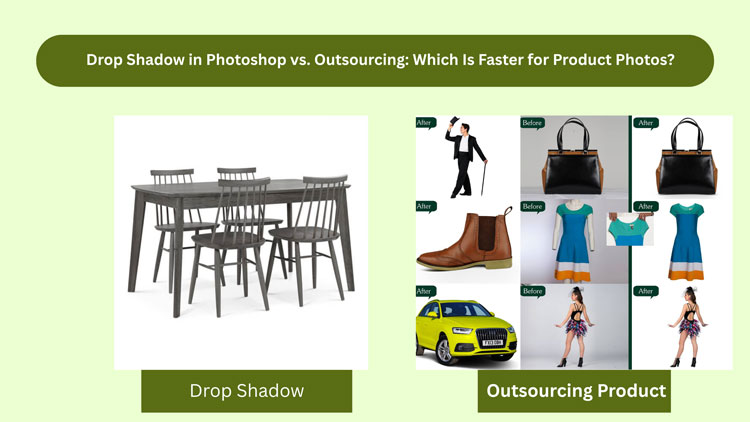
If you are trying to ship clean, conversion-friendly drop shadow product photo images on a deadline, you have probably faced the same question everyone eventually hits: should you do drop shadows in Photoshop yourself, or should you outsource them? In this guide, I will compare Photoshop versus outsourcing specifically through the lens of speed, without ignoring the quality traps that slow people down.
Table of Contents
What Faster Really Means For Drop Shadow Product Image Work
Before we compare Photoshop and outsourcing, it helps to define what fast actually means. Most people only count the time it takes to create the shadow layer. But for a real production workflow, speed includes the entire loop: prepping, producing, reviewing, fixing, and delivering.
For a typical drop shadow, the timeline usually includes background cleanup, cutout accuracy, edge refinement, choosing a shadow style, matching direction and softness, adjusting opacity, exporting to the correct format, and making revisions after someone says, Can you make the shadow lighter and more realistic?
So when we say faster, we are really asking: which option gets you approved, consistent drop shadow product photo files with the least total time and friction?
The Two Main Paths: Photoshop Or Outsourcing
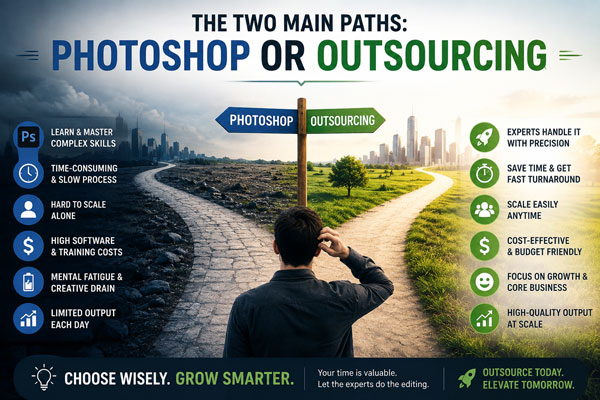
There are only two ways to consistently produce a drop shadow product image set:
You can do it in-house using Photoshop, usually with a repeatable template and some manual adjustments per image. Or you can outsource to a post-production partner who does product photo drop shadows all day and returns finished files ready to upload.
Both can be fast. Both can be slow. The winner depends on volume, complexity, and how structured your workflow is.
Drop Shadow In Photoshop: When It’s Actually Fast
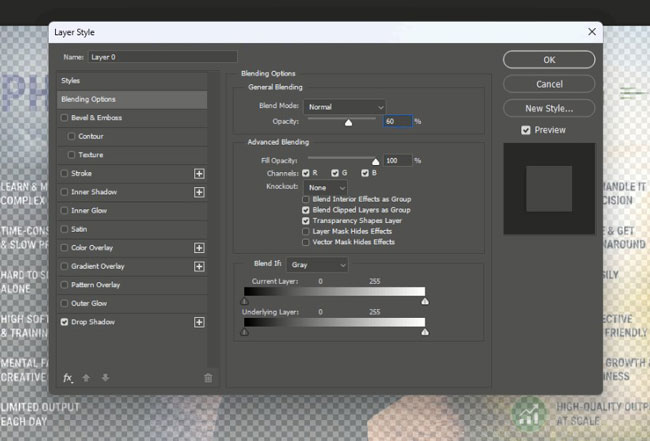
Photoshop is fast when the inputs are clean and the requirements are simple. If you already have a good cutout, your product shape is easy, and you are comfortable with Photoshop, you can produce a good drop shadow product image quickly.
For example, if you are working with a single product shot for a landing page and you want a subtle shadow under it, Photoshop might be the fastest choice. You can control everything in real time, preview it instantly, and export.
Photoshop also becomes fast when you have a consistent catalog and you build a process you repeat every day. If your product angles are similar, your light direction is stable, and your output specs do not change, then templates, actions, and smart object workflows can make each drop shadow more predictable.
But here is the catch: Photoshop speed is not just about the tool. It is about your setup. Without a stable setup, Photoshop becomes a time sink.
Where Photoshop Starts Getting Slow
Photoshop slows down when you have to figure it out per image. That happens more often than people think, especially with e-commerce photos that come from multiple shoots, multiple photographers, or multiple suppliers.
The common speed killers for drop shadow image work in Photoshop are messy cutouts, inconsistent lighting, reflective or transparent products, and unclear shadow requirements. If you are constantly zooming in to fix edges, rebuilding selections, and trying different shadow styles, you are no longer adding a shadow. You are doing post-production problem-solving.
Another hidden slowdown is decision fatigue. When you are editing 100 images, you want to stop making creative decisions and start executing a standard. If every drop shadow needs subjective judgment, your speed will drop, and your consistency will suffer.
The Real Photoshop Time Breakdown
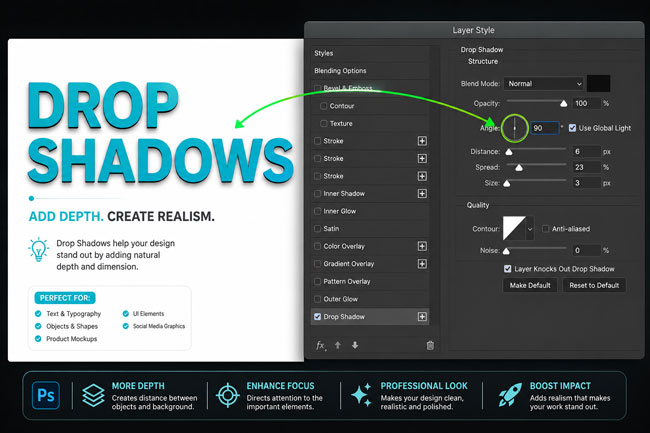
If you are estimating whether Photoshop is faster, do not time only the shadow step. Time the entire pipeline. A typical in-house drop shadow might involve:
- Preparing or fixing the cutout edges so the shadow does not reveal halos or jagged lines
- Creating a shadow that matches the product’s base contact and perspective
- Adjusting softness, blur radius, opacity, and spread so it looks natural
- Exporting in the correct size, naming format, and file type
- Doing review changes, especially when the set must match other products
Even if the shadow itself takes 30 seconds, the image might still take 4 to 8 minutes end-to-end, and revisions can double that.
Outsourcing: When It’s Faster Than Photoshop
Outsourcing is faster when the bottleneck is not how to do it, but how many do we have to do. If you have volume, recurring updates, multiple product lines, or seasonal launches, outsourcing often wins on total turnaround time.
A dedicated team can split the workload, run quality checks, and deliver consistent reflection shadow photography outputs while you focus on sourcing, listings, ads, or creative direction. The advantage is not that an outsourced editor uses a magic shortcut. The advantage is parallel production and a repeatable standard.
Outsourcing is also faster when your internal process is chaotic. If files arrive late, specs change mid-project, and your marketing team wants variations, an experienced post-production partner can absorb those changes without derailing your day.
The Outsourcing Speed Advantage: Parallel Work And Established Standards
When you outsource drop shadow product photo editing, speed comes from team capacity and specialization. A professional service already has shadow styles dialed in, already knows how to keep shadows consistent across a catalog, and already has a QA process that catches mismatched angles or inconsistent opacity before you see the files.
You also save time on tool switching. Many in-house teams lose time because Photoshop editing is just one of their responsibilities. Outsourcing removes that context switching. You brief once, then receive finished work.
When Outsourcing Becomes Slow
Outsourcing is not automatically faster. It becomes slow when the communication is unclear or the inputs are disorganized.
If you send mixed file types, unclear naming, no reference examples, and a vague instruction like make it look good, you will get questions, revisions, and delays. And if you are outsourcing a drop shadow product image job to someone who does not specialize in e-commerce standards, you might spend more time fixing errors than you would have spent doing it yourself.
The easiest way to make outsourcing fast is to provide a clear style reference. Even one approved image can serve as the golden sample for the rest of the set. When the standard is locked, turnaround becomes much quicker.
Which Is Faster For Different Product Photo Scenarios?
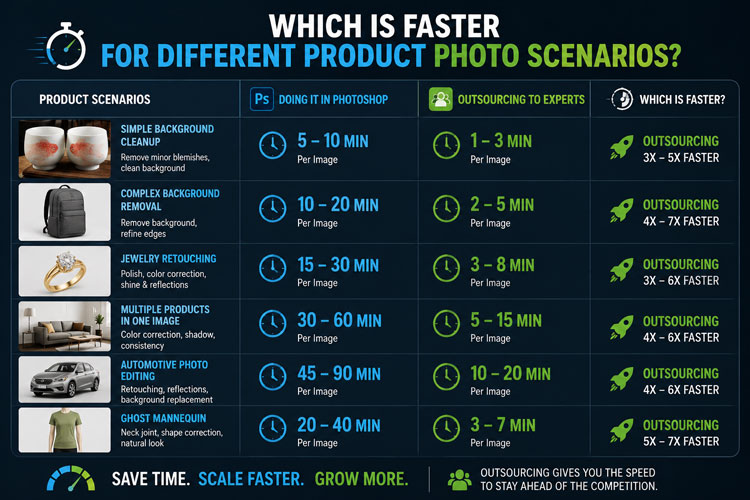
Let’s make this practical. Speed depends on what you are editing, how many images you have, and what done means for your store.
If you are editing a small number of images and you are already good at Photoshop, in-house work is often faster because there is no handoff. You can create a natural shadow effect immediately, tweak it live, and publish.
If you are editing medium to high volume, outsourcing is typically faster because of throughput. You can send 200 images, keep working on your business, and receive a consistent batch back.
If your products are difficult, outsourcing can be faster if the service has specialized editors. Transparent items, glossy surfaces, hairline edges, soft fabric products, and complex shapes can slow down most in-house workflows. A specialist team that handles these daily can deliver a better drop shadow product image with fewer revision loops.
The Quality Factor That Impacts Speed More Than You Think
Speed and quality are connected. A weak shadow might look done, but if it reduces trust or looks fake, you will lose conversions. Then you will redo it, and the project gets slower.
A strong drop shadow has a believable contact point, consistent light direction, and realistic softness. It does not float unnaturally, and it does not create harsh edges that scream Photoshop effect. The more realistic the shadow, the fewer internal complaints and fewer last-minute changes.
Outsourcing often wins here because consistency is easier to maintain across a large set when a team follows one standard with QC.
A Simple Way To Decide: Time Per Image Vs. Total Throughput
Here is a quick mental model that works well for most e-commerce brands:
If you can produce a consistent drop shadow product in Photoshop in under 2 to 3 minutes per image including export, and you only have 20 to 50 images, do it in-house.
If your time per image is 5+ minutes, or you have 100+ images, outsourcing will usually be faster when you account for fatigue, errors, and revisions.
Also consider your deadline pressure. If you need 300 drop shadow outputs by tomorrow, Photoshop is only faster if you have multiple trained editors and a system. Otherwise, outsourcing is the safer path.
The Hybrid Workflow
Many teams land on a hybrid workflow because it balances control and speed. They handle a few hero images in-house, especially for ads and banners, and outsource the bulk catalog images that need to add shadow to product image at scale.
This can be surprisingly efficient. Your internal team keeps creative control where it matters most, while the outsourced team keeps the catalog moving.
If you are planning a hybrid approach, the secret is to keep the shadow style consistent across channels. Your ad creative should not look like it came from a different universe than your product listing pages. A shared style guide makes the whole pipeline faster.
What To Send If You Want Outsourcing To Be Fast
If you decide to outsource, your prep work determines your turnaround. The best briefs are short, clear, and visual.
Send your raw or clipped files, specify output requirements, and include at least one reference for the exact drop shadow style you want. Mention background color requirements, canvas size, file format, and naming rules.
If you want minimal back-and-forth, include answers to these questions in your first message: do you want natural shadow, drop shadow, or reflection shadow? Do you want pure white background or transparent? How strong should the shadow be? Should the shadow match existing images in your store?
The Bottom Line: Which Is Faster?
If you are working on a small set, you are skilled in Photoshop, and you want immediate control, Photoshop is often faster for a drop shadow.
If you are working on a catalog, you care about consistency, and you want volume delivered without disrupting your day, outsourcing is usually faster for drop shadow editing.
In other words, Photoshop wins on instant control for small batches. Outsourcing wins on throughput, consistency, and total time saved for bigger batches.
Why Many Brands Choose Cutout Image Media For Drop Shadow Product Image Editing
At Cutout Image Media, we have been doing product photo post-production for 15 years, supporting e-commerce brands in the USA and worldwide. Our team specializes in clean cutouts, natural-looking shadows, and consistent catalog-level edits, so your drop shadow images look professional across every SKU.
We focus on high-quality results, quick turnaround, and a workflow that reduces revision cycles. Client satisfaction is not a tagline for us, it is how we run production and QA on every order.
FAQs
How Long Does A Drop Shadow Product Image Take In Photoshop?
A simple drop shadow image can take a few minutes, but the real time depends on cutout quality, edge cleanup, shadow realism, export specs, and revision requests for consistency.
Is Outsourcing Drop Shadow Editing Worth It For Small Batches?
If you have only a few images and strong Photoshop skills, doing it yourself can be quicker. Outsourcing becomes more valuable when you want consistent results and fewer distractions.
What Makes A Drop Shadow Look Realistic?
Realistic shadows match the product’s contact point, perspective, and light direction. Softness and opacity should feel natural, not like a heavy Photoshop effect or a floating object.
Do I Need Clipping Path Before Adding A Drop Shadow Product Photo?
Usually yes. A clean selection or clipping path helps prevent halos and jagged edges. Without it, the shadow can reveal messy outlines, which slows down approvals and causes rework.
Can You Match My Existing Drop Shadow Style?
Yes, matching an existing style is easiest when you share one approved reference image. That lets editors align direction, blur, opacity, and spacing so new images blend perfectly with your catalog.
Final Thought
If you are tired of spending hours polishing shadows, second-guessing consistency, and re-exporting the same drop shadow image files again and again, we can help. At Cutout Image Media, we handle the cutouts, shadows, and QC as a dedicated production team, so you get clean, marketplace-ready images without the workflow stress. Send us a small sample set today, and we will deliver a polished drop shadow product photo style you can confidently scale across your entire catalog.