
If you sell online, you already know the uncomfortable truth: customers can’t touch your product. They can’t feel the fabric, test the grip, or check the finish under real light. So your product photo has to do all the heavy lifting.
That’s exactly where a clipping path comes in.
A clean, accurate cutout helps your product look sharp, consistent, and trustworthy across Amazon, Shopify, Etsy, eBay, Walmart, and your own website. It also makes it easier to create white-background images, lifestyle composites, catalog layouts, ads, and seasonal banners without re-shooting everything.
At Cutout Image Media, we’ve spent 16 years working in product photo post-production for e-commerce brands. And clipping path is still one of the most important foundations for professional-looking product images.
Table of Contents
What is a clipping path?
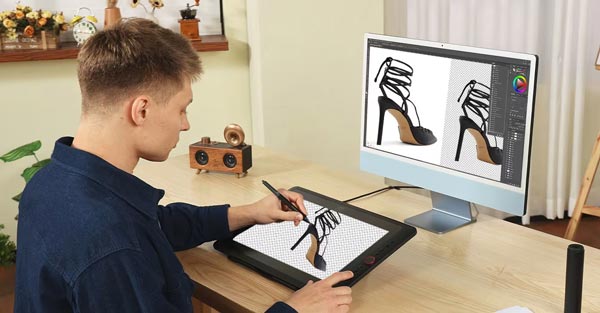
A clipping path is a hand-drawn vector outline that isolates a product from its background. Think of it as creating a precise “boundary line” around the product so the background can be removed, replaced, or edited without damaging the product edges.
Unlike one-click background removers that guess the edges, a professional clipping path is usually created manually with the Pen Tool. That manual approach matters because product edges are rarely perfect. You have curves, holes, tiny gaps, reflective parts, and subtle contours that automation often misses.
The end result is a clean cutout where the product looks natural, the edges look crisp, and the image is ready for any background you need.
Why clipping path matters so much for e-commerce
Most product photo problems online are not camera problems. They’re consistency problems.
Your store might have great products, but if the images have uneven backgrounds, distracting shadows, messy edges, or different crops, shoppers feel it instantly. The experience becomes less “brand” and more “random listing.”
Clipping path solves this by giving you control. Once the product is properly cut out, you can standardize everything: background color, alignment, spacing, shadows, and even the overall feel of your catalog.
Here are a few real, practical benefits you’ll notice right away:
First, your product looks cleaner and more premium. Even budget products can look high-end when the presentation is polished.
Second, your catalog becomes consistent. When every image shares the same background and framing, your storefront looks more trustworthy, and customers browse longer.
Third, you can reuse the same product cutout across marketing. You can drop it into a banner, a comparison chart, a holiday promo, or a social ad without re-editing from scratch.
And finally, you reduce returns caused by misleading photos. When your edges are accurate and colors look right, customers know what they’re buying.
Clipping path vs. background removal vs. masking: what’s the difference?
People often use these terms interchangeably, but they’re not the same. The best method depends on what you’re photographing.
A clipping path is best for products with hard edges. Think shoes, bottles, electronics, boxes, furniture, tools, cosmetics packaging, and most retail items with clear borders.
Image masking is better for soft or complex edges. Hair, fur, feathers, sheer fabric, and semi-transparent objects usually need masking rather than a strict vector path.
Then there’s automated background removal, which can be fine for quick drafts, internal mockups, or low-stakes images. But for listing images where edge quality affects perceived value, automation often creates “cut-out looking cutouts,” especially around curves and reflective surfaces.
In professional product photography post-production, clipping path and masking are often used together. For example, you might use a clipping path for the solid body of a product and masking for a transparent section or soft detail.
Types of clipping path services used in product photography
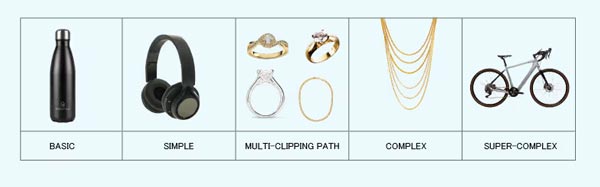
Not all products require the same level of pathing. In e-commerce, clipping paths are typically grouped by complexity:
A simple clipping path works for products with clean outlines and minimal curves, like books, phone cases, or boxes.
A medium clipping path suits items with more curves and parts, like shoes, kitchen tools, or certain cosmetics.
A complex clipping path is needed when the product has many edges, holes, or overlapping sections, such as jewelry, bicycles, floral items, or intricate accessories.
A multiple clipping path is used when you need to isolate separate parts of the same product. This is common for color correction on different components, such as changing the color of a label while preserving the bottle, or adjusting the metal and leather parts separately on a watch or bag.
This is one of those behind-the-scenes things that dramatically speeds up professional editing workflows. When the selections are separated correctly, you can make targeted edits without touching areas you want to keep intact.
The white background requirement
Many marketplaces prefer or require a clean white background, especially for the main image. The goal is simple: fewer distractions, clearer comparison, and a consistent shopping experience.
But getting a pure white background in-camera is harder than it sounds. Even in a studio, you can end up with gray edges, uneven tones, color casts, or shadows that look dirty.
With a proper clipping path, you can place the product on a clean, uniform background while keeping natural-looking edges. You can also add controlled shadows so it doesn’t look like the product is floating.
That combination, clean cutout plus realistic shadow, is what makes a “marketplace-ready” product image look professional instead of artificial.
How clipping path improves conversions
Shoppers don’t “love clipping paths.” They love clarity.
When your product edges are clean, your background is consistent, and the product is centered properly, the listing becomes easier to scan. The customer understands the product faster, and friction drops.
A polished catalog also signals that you run a legitimate business. That sounds subtle, but it matters. In crowded categories, trust is often the deciding factor. Two sellers may offer similar products at similar prices, but the one with cleaner images usually looks safer to buy from.
Better images also help your ads. A clean cutout tends to perform better in display placements and social creative because the product stands out instantly, even on small screens.
Common clipping path mistakes that make product images look cheap
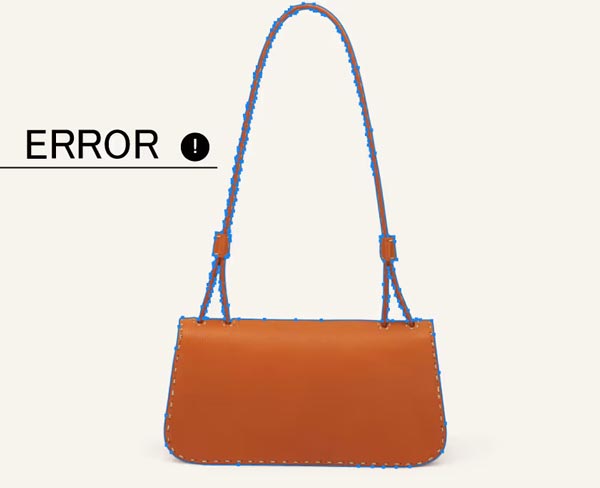
This is where many sellers unknowingly lose quality. Even a “removed background” can look wrong if the edges are mishandled.
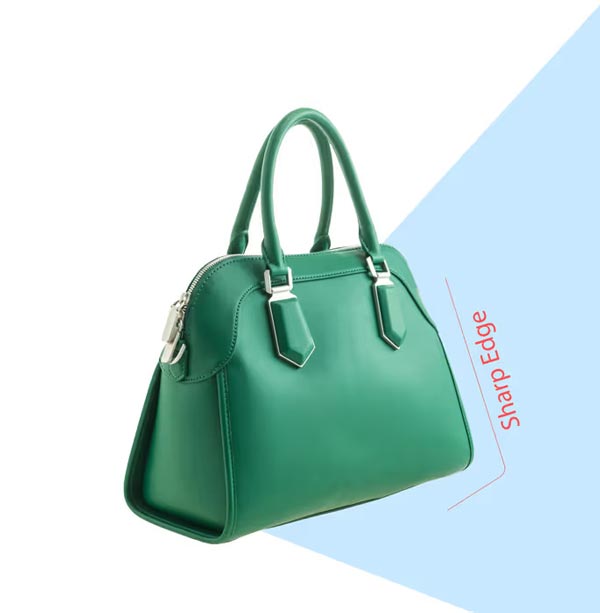
One big mistake is jagged or pixelated edges. This usually happens when someone uses quick selection tools or low-quality exports.
Another is overcutting. If the editor trims too tightly, you lose natural edge softness, and the product looks unnaturally sharp.
Undercutting is just as bad. If a thin halo of the old background remains, it becomes obvious on white or colored backgrounds, especially around dark products.
Then there’s inconsistent shadow handling. Some images have heavy shadows, others have none, and suddenly your store looks like it was assembled from different brands.
A good clipping path workflow avoids all of this by focusing on edge accuracy, consistent spacing, and controlled shadow creation.
When you should choose clipping path
If your product has clear, defined edges, clipping path is usually the best option. It’s especially useful for bulk editing because the cutouts can be consistent across hundreds or thousands of SKUs.
But if your product includes soft transparency or fine strands, like hair on a wig, fur on a blanket, mesh material, or glass objects with complex refraction, you may need masking or a hybrid approach.
The best vendors won’t force a single method on every job. They’ll choose the technique that preserves realism.
A practical workflow for e-commerce product photo editing
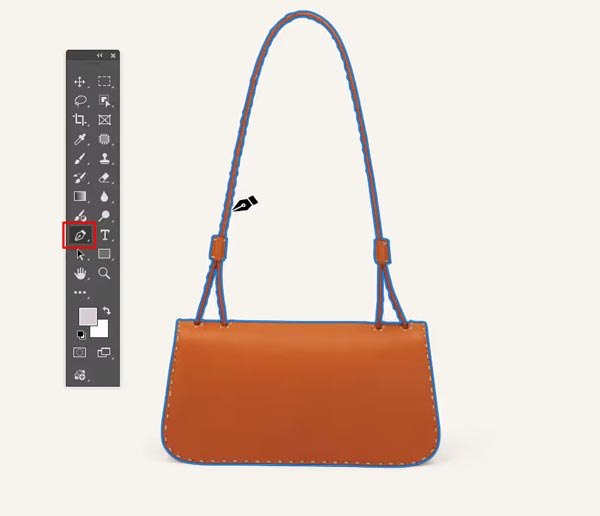
Most brands want three things: speed, consistency, and quality. The easiest way to get there is to use a repeatable workflow.
Here’s what a solid product image workflow often looks like:
- Clipping path or masking to isolate the product cleanly
- Background standardization (pure white or brand color) with consistent alignment and margins
- Color correction and exposure balancing so images look uniform across the entire catalog
- Shadow creation (natural or drop shadow) so products feel grounded
- Dust, scratch, and reflection control to remove distractions without making the product look fake
- Export optimization for marketplaces and web speed without losing visible quality
Notice something important: clipping path is the starting point. Once the cutout is right, everything else becomes easier and cleaner.
Why professional clipping path is still worth it in the AI era
AI tools are improving fast, but product photos are unforgiving. A tiny edge mistake can make your listing look unprofessional, and in e-commerce, small signals have big effects.
Professional clipping path is worth it when you care about detail, especially if you sell premium products, run paid ads, or manage a large catalog. It also pays off when your product shapes are tricky: reflective packaging, chrome, glossy plastic, tight curves, or parts with cutouts.
The goal isn’t “perfect editing.” The goal is believable editing that keeps your product looking real, accurate, and consistent.
FAQs
What is a clipping path in product photography?
A clipping path is a manual vector outline that separates your product from the background. It helps create clean cutouts for white backgrounds, ads, catalogs, and consistent e-commerce listings.
When should I use clipping path instead of image masking?
Use clipping path for hard-edged products like boxes, bottles, electronics, and tools. Use masking for hair, fur, sheer fabric, and transparency where soft edges must stay natural.
Can clipping path help my Amazon or Shopify images look more professional?
Yes. Clean cutouts and consistent backgrounds make your storefront look polished and trustworthy. This improves scanability, supports brand consistency, and often boosts engagement on listing pages.
What is a multiple clipping path and why is it useful?
A multiple clipping path isolates different parts of the same product. It allows precise color correction and edits on specific areas like labels, metal parts, or fabric without affecting the rest.
Why do some cutout images look fake even on a white background?
Usually it’s due to jagged edges, halos, overcut outlines, or unnatural shadows. A professional clipping path keeps edges clean and adds realistic shadowing so the product doesn’t look pasted.
How we handle clipping path at Cutout Image Media
At Cutout Image Media, we specialize in post-production for e-commerce and product photography, and we’ve been doing this for 15 years. Our designers focus on clean edges, natural results, and consistent output, because that’s what makes product images sell.
We don’t treat clipping path as a checkbox. We treat it as the foundation of your catalog. When the cutout is correct, your product looks better on every platform, your brand looks more consistent, and your creative team moves faster.
Client satisfaction is our main concern, and our workflow is built around that. We aim to deliver images that are ready to upload, ready to advertise, and ready to scale as your product line grows.